Jev vs GPT: Choosing the Right AI for Your Software
Jev vs GPT: Choosing the Right AI for Your Software
AI can do more than write emails and answer questions. In many business applications, it is asked to make small, repeatable decisions: classify a support ticket, flag a suspicious order, or decide which team should handle a request.
These tasks are different from writing a paragraph. They have a limited set of possible answers, and the software needs a reliable result it can act on.
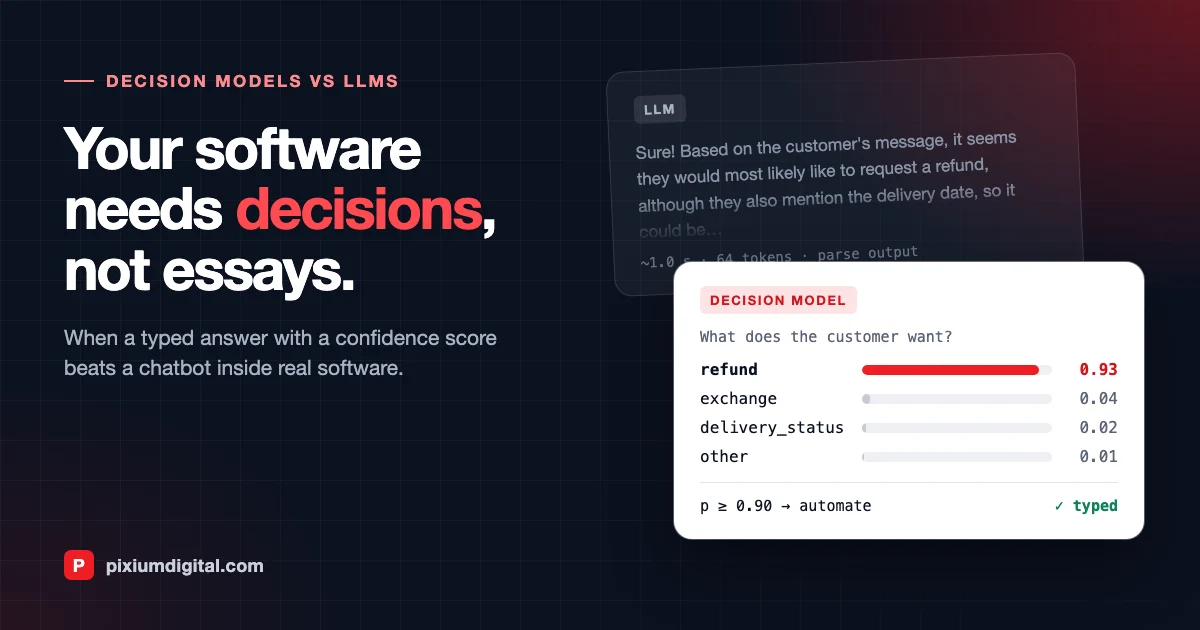
That is the problem Jev is designed to solve. Rather than generating text like GPT, Jev returns a structured decision and probabilities for the available answers. The two approaches serve different purposes—and in many applications, they work best together.
What is the difference?
GPT is a general-purpose language model. It is useful when you need to generate or understand text, explain something, summarise a document, or work through a complex request.
Jev is a decision model. You provide the information to evaluate and define the possible answers in advance. Jev selects an answer and returns probabilities for the options.
For example, given a customer message, GPT might explain why the customer appears to be asking for a refund. Jev can classify that same message into one of your predefined categories, such as refund, delivery_status, or complaint.
| Need | Better fit | Why |
|---|---|---|
| Classify a support ticket into known categories | Jev | The possible answers are defined in advance |
| Assign a lead a score using a clear rubric | Jev | It returns a score on a scale you define |
| Draft a reply to a customer | GPT | The result needs to be natural language |
| Summarise a contract or a long conversation | GPT | The task requires generating and understanding longer text |
| Calculate a price or apply exact business rules | Ordinary code, with AI if needed | Calculations and deterministic rules should be handled explicitly |
Jev is not a replacement for GPT. It is an option for the parts of a workflow where the job is to choose, classify, or score—not to write.
Practical example: routing customer support tickets
Imagine an online store receives hundreds of support messages every day. Before a team member reads each message, the application needs to decide where it should go.
You define five possible categories:
refundexchangedelivery_statuscomplaintother
A decision model can classify each incoming message. Your application can then use the result to route the ticket automatically when the model is sufficiently confident. If the result is uncertain, the ticket can be sent to a person for review.
Here is the basic logic in pseudocode:
result = decide(
    state=ticket_text,
    question="What does the customer want?",
    options=[
        "refund",
        "exchange",
        "delivery_status",
        "complaint",
        "other",
    ],
)

if result.label == "delivery_status" and result.probability >= 0.90:
    send_tracking_reply()
elif result.probability < 0.60:
    assign_to_human(ticket)
else:
    route_to_queue(result.label)
This illustrates the approach rather than a specific vendor SDK; check Jev's current documentation for the exact API syntax and response fields.
The important part is not just the classification. It is what your software does with the result:
- High confidence: automate a low-risk action, if your tests support it.
- Medium confidence: route the ticket to the appropriate queue.
- Low confidence: ask a person—or a more capable language model—to handle the case.
The thresholds above are examples, not universal recommendations. Choose them based on testing with real tickets, and review the consequences of incorrect decisions before automating actions.
A short tutorial: try the pattern in your own workflow
You do not need to redesign an entire application to test a decision model. Start with one small task that already has clear outcomes.
1. Choose one repetitive decision
Pick a task such as categorising incoming support messages. Avoid starting with a task that requires complex reasoning, several calculations, or an open-ended answer.
2. Define the possible answers
Write down a short list of categories that covers the cases your application actually sees. Include an other or review path for messages that do not fit.
3. Prepare a small test set
Collect a sample of real or representative messages and label the correct category for each one. Keep this set separate so you can compare the model's predictions with the expected answers.
4. Ask the model to classify each message
Send the message as the input state and ask a question with your predefined options. Record the selected answer and its probability. Use the current Jev documentation to implement the request in your chosen language.
5. Measure results before automating
Check how often the model chooses the correct category. Pay particular attention to costly mistakes—for example, sending a complaint into an automatic refund flow. Test the confidence thresholds against your own examples rather than assuming that a high probability guarantees correctness.
6. Add a safe fallback
Begin with suggestions or queue routing rather than irreversible actions. Send uncertain cases to a person or GPT for further interpretation. Expand automation only when your evaluation shows that it is appropriate.
This small experiment helps you decide whether a decision model improves speed, reliability, or cost for your specific task.
Why use Jev instead of GPT for a decision?
The main advantage is the shape of the output. With a general-purpose language model, developers often need to instruct the model to return a particular format and then validate the response before using it. A response may be valid JSON but still contain an unexpected category or a value your application cannot handle.
With Jev, the answer options are part of the question. The model returns a choice from that set along with probabilities, making it easier to connect the result to ordinary application logic.
That can simplify an integration and make it easier to define what happens when the model is uncertain. Jev may also be faster or less expensive for some real-time classification workloads, but the actual difference depends on the task, model, usage pattern, and pricing. Test both options with your own workload before making a decision.
Structured output does not mean the answer is always correct. A decision model can return a valid category and still choose the wrong one. Evaluation, monitoring, and sensible fallbacks remain necessary.
When GPT is still the better choice
Use GPT when the application needs to create text, explain a result, summarise a document, understand a long conversation, or work through a task that needs several reasoning steps.
For instance, Jev might classify a message as a complaint. GPT could then help summarise the complaint and draft a response for a support agent to review.
This combined design gives each model a focused role:
- Jev classifies or scores incoming information.
- Your application applies rules and decides what can safely happen automatically.
- GPT or a person handles exceptions that need explanation, nuanced language, or further reasoning.
You do not have to use both models. If the workflow is mostly about generating text, GPT may be enough. If it is a simple, high-volume decision with known outcomes, testing a decision model may be worthwhile.
A simple rule of thumb
Choose Jev when you can define the possible answers in advance and need a structured decision. Choose GPT when you need language, explanation, or broader reasoning. Use ordinary code for calculations and deterministic business rules, and add a human review step wherever mistakes could have serious consequences.
Start with one real workflow, test it on examples from your own data, and compare accuracy, latency, cost, and failure handling. That will tell you more than a general benchmark can.
Further reading
- TypeSafe AI, Introducing System One Models & Jev
- TypeSafe AI documentation, System One concepts and Models, prices and context length
- Denney and DiGiuseppe, Jev versus LLMs: Accuracy, Cost and Calibration on Seven Political Science Replications
Product capabilities and pricing can change. Check the current documentation and evaluate the model on your own data before using it in production.